Built-in geometric shapes
In 3D modeling, most creative workflows start with basic geometric shapes. By editing elements such as vertices, edges, and faces, and gradually adjusting the topology, complex models are ultimately constructed. This process is commonly known as "modeling from primitive shapes."
Make3D provides a variety of commonly used built-in primitive geometries, such as cubes, spheres, cylinders, cones, and planes. Users can directly invoke these initial shapes and combine them with polygonal modeling tools—such as subdivision surfaces and Boolean operations—for further refinement, efficiently transforming simple geometric forms into complex models. These primitive shapes not only provide an excellent starting point for modeling, but also ensure structural integrity and controllability throughout the subsequent editing process.
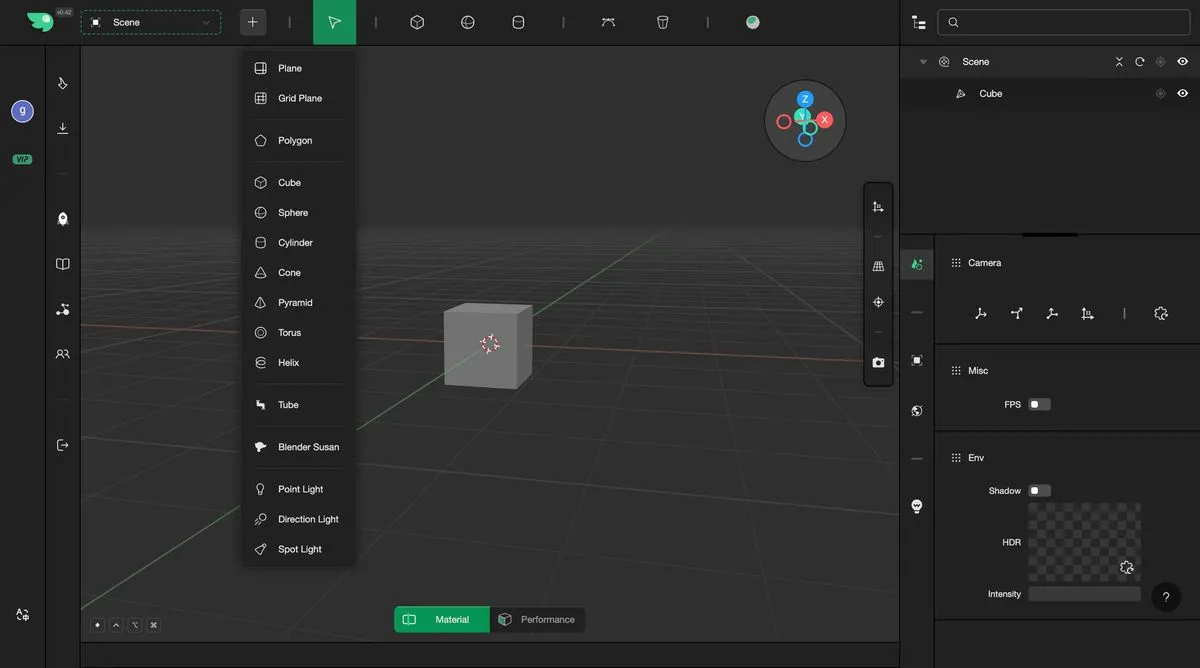
As shown in the image above, clicking the "+" button allows you to select the desired geometric primitive from the list. The newly added geometry will be automatically generated and placed at the origin of the world coordinate system (i.e., the center position), facilitating subsequent editing and alignment operations.